
RMTT Maintenance Windows
What are RMTT maintenance windows? When time sensitive security updates or configuration changes require a reboot, RMTT schedules those to occur during maintenance windows. This is a notification letting you know that reboot is happening in 5 minutes What are the default maintenance windows? Workstations: Wednesdays between 2:00AM and 3:00AM Servers: Tuesdays between 2:00AM and 3:00AM Why am I seeing this outside of that time? If your computer is powered off, asleep, or in a hibernated [...]

Enabling Email Encryption in M365 (S/MIME ERROR)
If you have a client that is attempting to encrypt emails using the built in Office365 email encryption but users are getting an error about now having an S/Mime certificate, please follow the steps below. First, you want to make sure the users have the correct license. This license is included in E3 and above. Alternatively, you can purchase the Azure Information Protection Premium P1 license for $2/user/mo. Next we need to enable it [...]

DFS Replication (DFSR) Fix
Sample Event Log Entry Source: DFSR Date: 2/25/2016 3:14:40 PM Event ID: 4012 Task Category: None Level: Error Keywords: Classic User: N/A Computer: TTLCloudDC01.ttlcloud.local Description: The DFS Replication service stopped replication on the folder with the following local path: C:WindowsSYSVOLdomain. This server has been disconnected from other partners for 107 days, which is longer than the time allowed by the MaxOfflineTimeInDays parameter (60). DFS Replication considers the data in this folder to be stale, and [...]

Connecting to SimpleHelp with Your Mac
1 | Navigate to help.rmtt.com 2 | Click the blue "download remote support" button 3 | Once downloaded, open the downloads and open the "RMTT Remote Support-macos-online.dmg" file 4 | Double click the blue Remote Support icon 5 | Click "Open" on the downloaded content warning 6 | Click "Accept" on the disclaimer window 7 | [...]
Microsoft 365 – Adding user access to mailbox via PowerShell
This will enable you to open shared mailboxes using the Open Another Mailbox option in Outlook Web App Run PowerShell as Admin Connect to Exchange Online Install-Module -Name ExchangeOnlineManagement -Force Connect-MsolService Connect-ExchangeOnline -UserPrincipalName [admin email address] -ShowProgress $true Add-MailboxPermission -Identity [user mailbox to share] -User '[user account]' -AccessRights FullAccess -InheritanceType All -AutoMapping $true

SOPRO Imaging Install
You are going to want to run the installer for SOPRO, typically located in the \\server1\Sopro Imaging\Sopro Imaging Installer\Sopro Imaging setup.exe Follow all the steps for the installer. Run SOPRO imaging. Click new Add a name like Dr Wrong Database Double click the new doctor that you created (might also see one titled demo) Top left > File> Setup Change the images folder path to the correct one In this case, it was \\server1\Sopro Imaging\Images [...]
Outlook not loading, connecting or logging in
If you run into a weird issue where Microsoft Outlook is not fully loading, logging in or refusing to connect—here is the fix: Start menu > Access school or work (type school) Disconnect email address Open Microsoft Word, go to account, sign out of email Close and reopen Word, log in like normal, should be good If this doesn't resolve the issue, sometimes you need to delete all Office-related credentials from Credential Manager too. [...]

Eaglesoft not connecting to database
We recently replaced a workstation at a local dentist office. We were able to ping the server by both IP and hostname, same version of Eaglesoft running on the server and the workstation, we can access the DATA file. However we constantly received the following error: “Database server not found” We uninstalled and reinstalled EagleSoft, rebooted server, rebooted workstation, uninstalled bitdefender, disabled firewall, ensured all updates are done ... contacted EagleSoft support and were still not able to get [...]

pfSense — Disable TCP timestamps to pass PCI compliance scan
We were working with a client to disable TCP timestamps (RFC1323) on pfSense to pass their PCI compliance scans. Referencing this thread ( Pfsense disable tcp timestamps RFC1323 ), it should be in system tunables but it was not present. To make this happen, go in through ssh and use sysctl to change it, it's not listed in the gui. Command is sysctl net.inet.tcp.rfc1323=0 you can also use sysctl -a to list all system [...]

Bridging Softdent and PlanMeca
We couldn't find much of a solid guide out there for the right process connecting Softdent to PlanMeca. Call PlanMeca, they will tell you call Softdent. Call Softdent, they tell you call PlanMeca. Sharing this in case anyone else needs to integrate PlanMeca as their primary imaging software. You need to install the planmeca "PMBridge" this should be included with your Romexis software. If you have the original USB flash drive it's in the [...]

pfSense – OpenVPN iDRAC Access Failsafe
Clients with a pfSense can be set up with iDRAC access via OpenVPN even when the DC/server has crashed. If OpenVPN has not been set up, set up following OpenVPN wiki.

RMTT Holiday Party 2021
On Friday, December 10th, the team got together for a night out full of games, races & friendly competition at the Dave & Busters in Westminster. The holiday party was a great chance to catch up with everyone and celebrate the new year on the way.

Missing Xrays in Dexis
If the practice staff inadvertently archives images, you can do the following to get everything back the way it was. Click the folder at the top and ensure that the correct xray is selected to display. Verifying To ensure an xray has not been deleted, note the patient ID. For example, this patient's ID is 00000574. Go to the data folder and navigate to \0\0\0\0\0\5\7\4 Count the images in the folder, if they are not [...]

Add Shared Calendar to a Microsoft Team Group
Several clients have asked about adding a shared calendar to a Team's Group so they can all view and edit it directly in the Teams app separate from Outlook. Unfortunately, this isn't a native feature, but sounds like it is something that Microsoft is working on. Right now there isn't a built-in shared calendar feature for a Team's Group. We did however find a valid work around and thought I would share. Basically, you [...]
RMTT Mountain Gear Patches
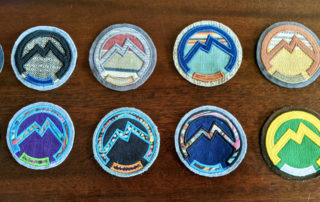
Introducing our new line of RMTT patches. Perfect for all your on-the-go Rocky Mountain outdoor gear! Check out @bratchpatches on Instagram for more Grateful Dead goodness.